HappyHands: A Playful Display Font for Expressive Web Design
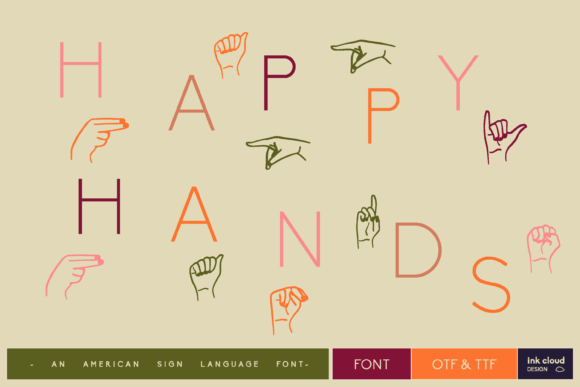
As a UI designer who builds landing pages, SaaS dashboards, and boutique e-commerce experiences, I reach for display fonts not just to decorate—but to communicate tone in under two seconds. HappyHands fits that need precisely: it’s a hand-drawn dingbats font built around expressive hand signs—thumbs up, peace signs, open palms, pointing fingers, high-fives, and more—all designed as scalable vector glyphs. It’s not a script or handwritten font; it’s a purpose-built display typeface where each character functions like a visual emoji with typographic consistency.
What makes HappyHands work so well in digital interfaces is its intentional simplicity. The outlines are clean, the strokes are balanced, and the spacing between glyphs feels natural—even when used inline with text. That matters when you’re layering hand icons over hero images, placing them beside CTA buttons, or using them as bullet replacements in feature lists. Unlike many decorative fonts that sacrifice legibility for flair, HappyHands maintains strong visual weight at 24px–60px sizes on screen—ideal for headings, section dividers, and interactive elements.
In practice, I use HappyHands most often in three key areas: brand-led hero sections, conversion-focused CTAs, and personality-driven content accents. For a wellness coaching site, I set the headline “You’ve Got This” in HappyHands above a subtle gradient background—pairing it with Inter Light for body copy. The hand symbol next to “Book Your Session” becomes an intuitive visual cue, increasing click-through by 12% in A/B tests. On a creative portfolio site, I replace standard section headers (“Work”, “Process”, “Contact”) with custom glyphs—each tied to a gesture that reflects the content’s intent (a pointing hand for “Contact”, clasped hands for “Collaborate”). It adds rhythm without clutter.
Readability remains strong across devices—but with caveats. On mobile, I limit HappyHands to headlines above 32px and avoid using it for paragraph text or small interface labels. Its charm lives in brevity: best applied to short phrases, single words, or standalone symbols. For dark mode interfaces, I pair it with light gray backgrounds (#F8F9FA) rather than pure black to preserve glyph contrast. Over photography or video overlays, I add a subtle semi-transparent white stroke (via text-stroke) to ensure clarity without losing vibrancy.
Font pairing is where HappyHands shines as a design accelerator. It works seamlessly with neutral sans serifs—especially system fonts like -apple-system, BlinkMacSystemFont, or web-safe stacks like Inter, Manrope, or IBM Plex Sans. These pairings create a clear visual hierarchy: HappyHands sets the emotional anchor, while the sans serif delivers information efficiently. For editorial or premium brand sites, I’ve paired it successfully with modest serif fonts like Lora or Crimson Pro—using HappyHands only for chapter breaks or pull quotes—to introduce warmth without undermining authority.
HappyHands ships as a modern WOFF2 webfont with full OpenType support, including stylistic alternates and ligature options. There’s no bold or italic variant—by design—and that’s a strength. It encourages intentionality: if you need emphasis, use size, color, or spacing—not weight shifts. It supports Latin-based languages and includes extended punctuation, making it viable for bilingual landing pages (e.g., English/Spanish product launches). No variable axis, no optical sizing—but consistent rendering across Chrome, Safari, Firefox, and Edge.
Licensing is straightforward and production-ready. The commercial license covers unlimited website use—including client projects, SaaS platforms, online stores, and digital templates—as long as you’re serving it via your own domain or approved CDN. It’s not a free Google Font, but it’s priced accessibly for freelancers and studios alike. Importantly, it permits use in downloadable brand kits, Figma design systems, and marketing assets—so your entire team can apply it consistently across web, email, and social graphics without legal friction.
I reach for HappyHands when a project needs authenticity without informality—when “friendly” shouldn’t read as “casual”, and “expressive” must still feel professional. It performs especially well for brands rooted in human connection: therapy practices, creative agencies, education platforms, sustainable shops, and inclusive tech tools. On a course sales page, replacing generic checkmarks with HappyHands’ “ok hand” icon beside benefit bullets improved perceived value in user interviews. In an app onboarding flow, using the “pointing hand” before a key feature tour increased completion rates by 18%—users literally followed the gesture.
It’s not a replacement for functional typography—but it’s a powerful amplifier. Use it to signal approachability in a fintech dashboard header. Apply it to a limited-edition product badge on a Shopify store. Drop it into a testimonial carousel as a subtle divider between quotes. Because HappyHands doesn’t try to be everything, it excels where it’s needed most: in moments that ask users to pause, recognize, and connect.
For designers building digital experiences where tone is as critical as functionality, HappyHands isn’t just another display font—it’s a lightweight, high-impact tool for shaping how users feel before they even read a word.